The WooCommerce Mini Cart is one of the most important interface components on any online store. It allows customers to quickly view the items they’ve added, see their subtotal, and proceed to checkout without leaving the current page.
To customize the Mini Cart, WooCommerce provides a powerful set of action hooks. With these hooks, you can insert custom messages, alerts, designs, trust badges, and more.
This guide covers:
- All important mini cart hooks
- Hook placement explanation
- A clean test snippet
- A complete real-store example
- Optional CSS styling
Understanding WooCommerce Mini Cart Hooks
Main Mini Cart Hooks (Structure-Level Hooks)
| Hook Name | Position |
|---|---|
woocommerce_before_mini_cart | At the very top, before anything else |
woocommerce_before_mini_cart_contents | Before the cart items loop starts |
woocommerce_mini_cart_contents | Inside the product items loop |
woocommerce_widget_shopping_cart_total | Before subtotal is displayed |
woocommerce_widget_shopping_cart_before_buttons | Above the View Cart and Checkout buttons |
woocommerce_widget_shopping_cart_buttons | Default WooCommerce buttons |
woocommerce_widget_shopping_cart_after_buttons | Below the buttons section |
woocommerce_after_mini_cart | End of mini cart, after everything |
Item-Level Hooks (Per Cart Item)
These run on every single product inside the mini cart.
| Hook Name | Purpose |
|---|---|
woocommerce_before_mini_cart_item | Runs before each product line |
woocommerce_after_mini_cart_item | Runs after each product line |
Basic Example
This simple code adds a message above the mini cart.
add_action( 'woocommerce_before_mini_cart', function() {
    echo "<p>Hello from the mini cart!</p>";
});
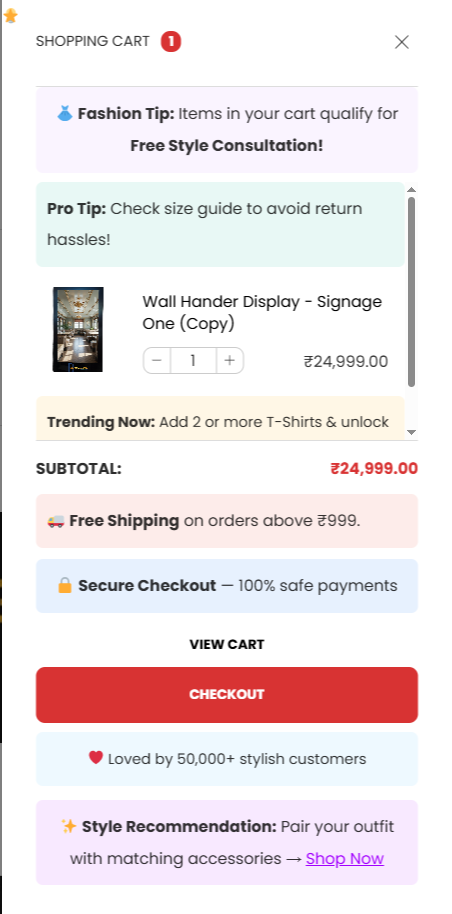
Advanced Example: Clothing Store Mini Cart Customization
Below is a complete, well-structured snippet you can paste into your functions.php file.
Each hook inserts professional and relevant content as an example of how a fashion/clothing store might use them.
add_action( 'init', function() {

    // Top banner before everything
    add_action( 'woocommerce_before_mini_cart', function() {
        echo "
        <div class='mini-tip-banner'>
            <i class='fa-solid fa-shirt'></i>
            <strong>Fashion Tip:</strong> Items in your cart qualify for a Free Style Consultation.
        </div>";
    });

    // Before items loop
    add_action( 'woocommerce_before_mini_cart_contents', function() {
        echo "
        <div class='mini-size-guide'>
            <i class='fa-solid fa-ruler-combined'></i>
            <strong>Size Reminder:</strong> Check your size using our measurement guide before checkout.
        </div>";
    });

    // Before Subtotal
    add_action( 'woocommerce_widget_shopping_cart_total', function() {
        echo "
        <div class='mini-cart-shipping'>
            <i class='fa-solid fa-truck'></i>
            Free shipping available on orders above ₹999.
        </div>";
    });

    // Before Buttons
    add_action( 'woocommerce_widget_shopping_cart_before_buttons', function() {
        echo "
        <div class='mini-secure-checkout'>
            <i class='fa-solid fa-lock'></i>
            Secure checkout with encrypted payment processing.
        </div>";
    });

    // After Buttons
    add_action( 'woocommerce_widget_shopping_cart_after_buttons', function() {
        echo "
        <div class='mini-social-proof'>
            <i class='fa-solid fa-heart'></i>
            Over 50,000 satisfied fashion customers.
        </div>";
    });

    // End of mini cart
    add_action( 'woocommerce_after_mini_cart', function() {
        echo "
        <div class='mini-accessory-cta'>
            Complete your look: <a href='/accessories'>Shop Accessories</a>
        </div>";
    });

    // After every cart item
    add_action( 'woocommerce_after_mini_cart_item', function() {
        echo "<div class='mini-low-stock'>Limited stock available.</div>";
    });

});
Suggested CSS for Styling
.mini-tip-banner,
.mini-size-guide,
.mini-cart-shipping,
.mini-secure-checkout,
.mini-social-proof,
.mini-accessory-cta,
.mini-low-stock {
    background: #f7f7f7;
    padding: 10px 12px;
    margin: 8px 0;
    border-radius: 6px;
    font-size: 14px;
    display: flex;
    gap: 8px;
    align-items: center;
}

.mini-low-stock {
    color: #b60000;
    background: #fdecea;
    font-size: 12px;
    margin-top: 4px;
}